Your screen's light,
dancing in the menu bar.
Barbeat turns your Mac's menu bar and the edges of your screen into a light show. It moves with whatever your Mac is playing, and it takes its colors from what's on screen, right down to the stage lights in a concert video.
Free and open source · Apple Silicon (M1 or newer) · macOS 14.2 or later · Signed and notarized by Apple
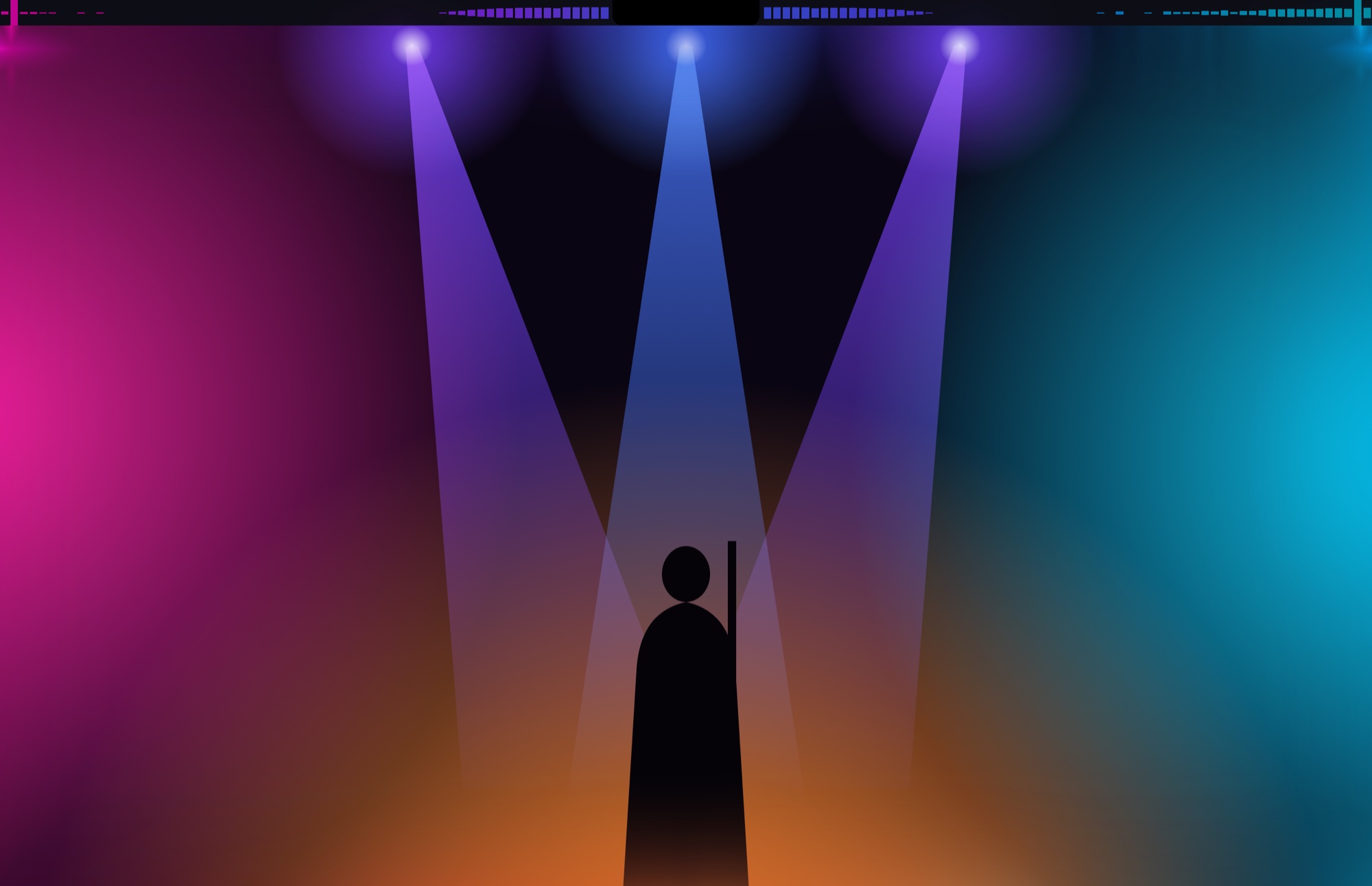
The light from your screen, spilling over.
Choose Screen under Colors and Barbeat watches what you're watching. The menu bar and the screen edges glow in the picture's own colors, spot by spot, as it changes.
Each spot matches the picture next to it
Every part of the menu bar and the edge glow takes the color of the screen right beside it, like backlighting behind a TV. A magenta spotlight on the left lights the left of the menu bar magenta; a cyan wash on the right turns the right side cyan.
The picture's strongest colors, as a palette
Barbeat picks the strongest colors on screen and paints the bars with them, fading smoothly as the picture changes. A good fit for styles that color by frequency.

Follow light beams
When a laser fan, a sweeping stage beam or a strobe hits the picture, Barbeat sees it the moment it appears and pours that light's own color into the menu bar and the edge glow beside it. The glow lights up even while the music is quiet, then fades over half a second, so sweeping beams leave a trail.
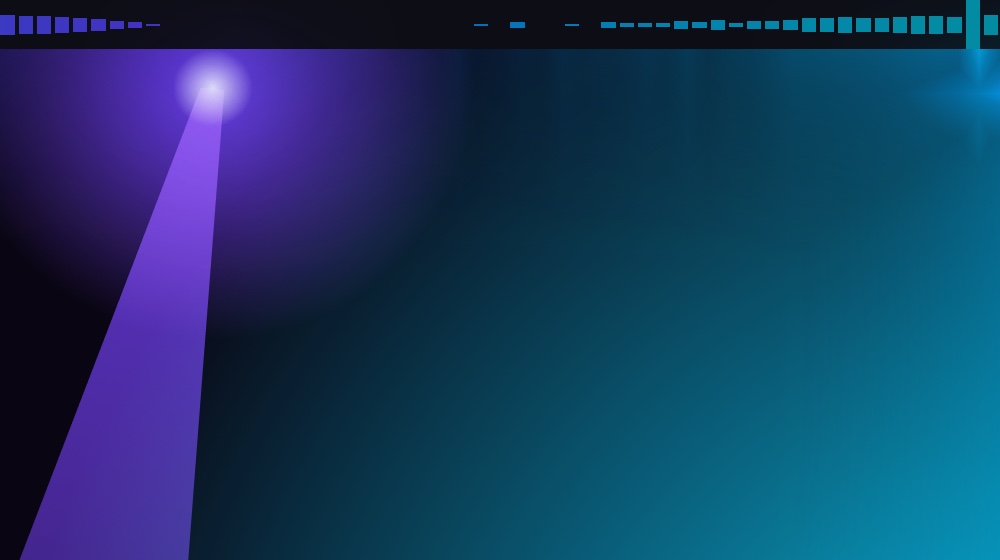
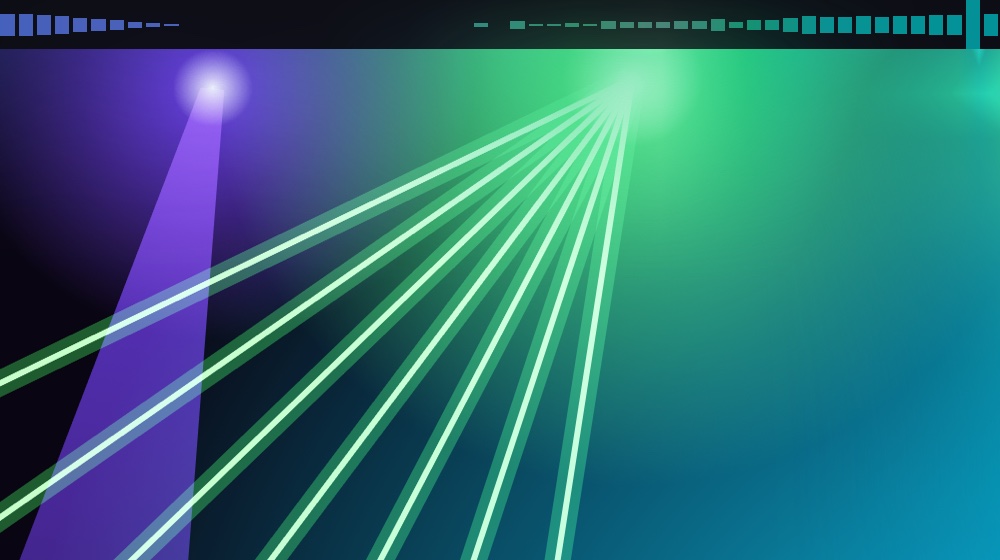
Barbeat only counts light that stands well above the rest of the picture and has just appeared or moved. Steady bright things, like a white window or captions, fade into the background within a few seconds. Strength sets how much of the glow a beam takes over. In Main colors, beams tint the brightest colors instead.
Screen colors need Screen Recording permission, and macOS shows its recording icon in the menu bar while they're on. Copy-protected video (some streaming apps) looks black to every app, so Barbeat keeps the last colors until the picture comes back.
Up and running in a minute
- Download and install.
Get
Barbeat-<version>.zipfrom the download page, unzip it and drag Barbeat into your Applications folder. - Open it.
macOS checks that you want to open an app from the internet: click Open. A bar-chart icon appears in the menu bar. Barbeat has no Dock icon.
- Allow system audio.
macOS asks to let Barbeat record system audio: click Allow. Barbeat only listens so it can animate; nothing is recorded or saved.
- Allow the screen, for Screen colors.
macOS also asks to let Barbeat record the screen. Allow it to have the colors follow what's on screen (if macOS offers Quit & Reopen, click it). Without it, pick any other palette.
- Play some music.
Barbeat starts with stereo Center bars in Ambient light colors and a deep glow around the screen. Click the bar-chart icon to change anything; changes apply instantly and are remembered.
Ten ways to see the music
Pick a style under Style. In Stereo layout the left channel plays left of the notch and the right channel to the right, with the bass hugging the notch. These pictures show the right half, starting at the notch.
LED
Segmented bars, like a hardware equalizer.

Bars
Solid bars.

Center
Bars that grow from the middle. The default.

Glow
A soft color wash that lights up with each frequency.

Pulse
The whole menu bar's color pulses with the beat.

VU
A stereo level meter shooting out of the notch.

Aura
Light hugging the notch that flares with the bass.

Waterfall
The last few seconds of music flowing out across the menu bar.

Scope
A live waveform, like an oscilloscope.

Sparks
Sparks shoot out of the notch on every beat.

Everything in the panel
Click the bar-chart icon in the menu bar. The switch at the top turns the whole show on or off.
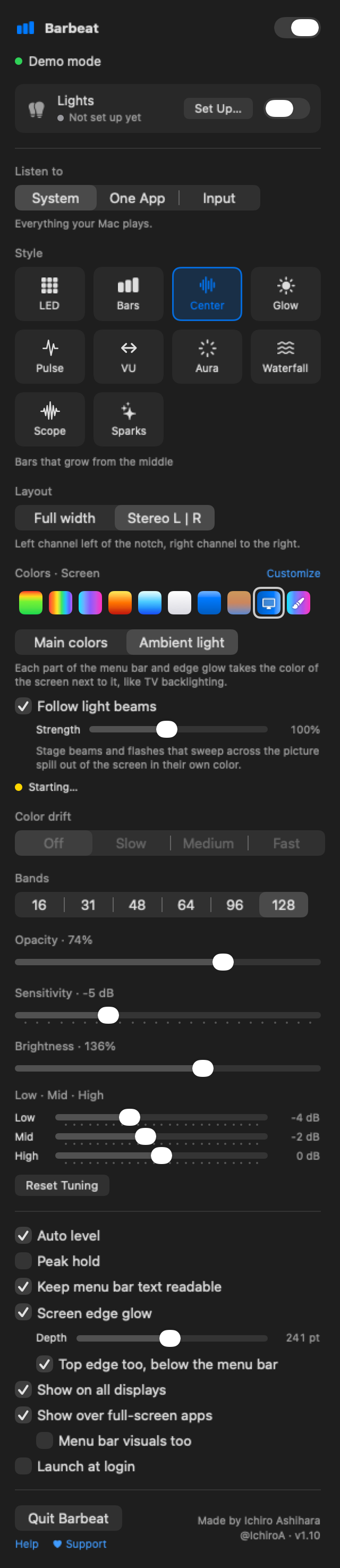
Sound
- Listen to
- System is everything your Mac plays. One App listens to a single app, say Spotify or Safari, so calls and alerts don't move the bars. Input uses a microphone or audio interface; macOS asks for microphone access the first time. If that input is unplugged, Barbeat listens to system audio until it's back.
- Sensitivity, Auto level
- Auto level adjusts to how loud the music is, so the bars always fill the menu bar. Sensitivity makes everything react more or less on top of that.
- Low · Mid · High
- Boost or calm the bass, mids or treble on their own. Reset Tuning puts these, Brightness and Spark power back to the starting values.
Look
- Style, Layout, Bands
- The ten styles above. Stereo L | R splits left and right around the notch; Full width spreads both channels together across the whole bar. Bands sets how many bars (16 to 128).
- Colors
- Classic, Spectrum, Neon, Fire, Ice, White, Accent (your Mac's accent color), Wallpaper (picked from your desktop picture), Screen and Custom. Customize copies any palette into Custom, where you set four colors, by frequency or by bar height, with Shuffle, colors from your wallpaper and four preset slots.
- Color drift
- Slowly turns any palette around the color wheel.
- Opacity, Brightness
- How see-through the bars are, and how strong the glow and colors are.
- Peak hold
- Little caps that hang at each bar's latest peak (LED, Bars, Center and VU).
- Keep menu bar text readable
- Tones down bar colors bright enough to wash out the menu bar's own text and icons, like white bars behind white text. Reds, blues and purples stay as they are, and the edge glow keeps its full colors.
Screen
- Screen edge glow
- A soft glow along the left, right and bottom edges of the screen. Depth sets how far it reaches in (up to a third of the screen). Top edge too adds the top, just below the menu bar.
- Show on all displays
- Draws on every screen, or just the main one.
- Show over full-screen apps
- Keeps the edge glow on all four sides while an app is in full screen. Turn on Menu bar visuals too to also draw the bars where the hidden menu bar would be; they step aside whenever you use the menu bar.
- Launch at login
- Starts Barbeat when you log in.
Take the show into the room
Barbeat can drive Philips Hue lights and Art-Net devices, like WLED LED strips and DMX fixtures, in the same colors as the menu bar, including Screen colors. Lights have their own switch, so Barbeat also works as a lights-only controller.
Philips Hue
- In the Hue app, make an Entertainment area with the lights you want.
- In Barbeat's panel, click Set Up… next to Lights, then Add Hue Bridge.
- Pick your bridge (or type its IP address), click Pair and press the round button on top of the bridge.
- Choose the Entertainment area. Identify blinks its lights one by one.
WLED and Art-Net
- Click Add Art-Net Device.
- Find Nodes lists devices on your network, or add one by IP address.
- For a WLED strip, Detect WLED fills in its name, LED count and settings.
- Choose what happens When Barbeat stops: hand back to WLED's own effect, fade to black, or hold the last color.
- Mode
- Auto picks for each device: Pulse for one light, Stereo for two, Bands for three to nine (a room-sized equalizer, bass on the left), and Mirror for strips, which copy the menu bar at the same spot.
- Base glow, Beat flash, Brightness, Delay
- How much the lights glow between beats, how hard they flash, how bright they get, and a delay for AirPlay or Bluetooth speakers that play late.
- Each device's switch
- Every Hue Bridge and Art-Net device has its own on/off switch in the Lights window. Switch one off to leave those lights alone for now (Hue lights go back to how they were) while the others keep playing. It stays set up for next time.
- Give back after
- When the music stops (10 s, 30 s, 2 min or never), when you turn Lights or a device off, quit or the Mac sleeps, Hue lights go back to exactly how they were before: on or off, brightness, color and scene.
Lights never flash more than three times a second. With Reduce motion turned on in macOS, flashes are halved. The first time, macOS asks for Local Network permission.
If something's off
The bars don't move
Open System Settings › Privacy & Security › Screen & System Audio Recording and make sure Barbeat is turned on. Then click Try Again in Barbeat's panel. If you chose One App, check that the app is actually playing sound.
Screen colors stay gray or say "needs permission"
Allow Barbeat under Privacy & Security › Screen & System Audio Recording (in the screen recording list), then click Try Again. macOS sometimes needs Barbeat to reopen before the permission takes effect.
The colors freeze while I watch a streaming service
Copy-protected video looks black to every app that reads the screen, so Barbeat keeps the last colors and picks up again as soon as the picture can be read. The music still moves the bars as usual.
The menu bar is hard to read
Turn on Keep menu bar text readable. You can also lower Opacity or Brightness, or try a calmer style like Glow or Pulse.
Nothing shows in the menu bar when an app is in full screen
By default full screen shows just the edge glow. Turn on Menu bar visuals too under Show over full-screen apps to also see the bars at the top.
The panel says "No visible menu bar"
Your menu bar is set to hide automatically, so there's nothing to draw behind. Change "Automatically hide and show the menu bar" in System Settings. The edge glow keeps working either way.
Does it use much battery?
The drawing runs on the graphics chip. On battery Barbeat draws at 30 frames a second instead of 60, and it stops drawing whenever it's silent. To save more, turn off Screen edge glow or Follow light beams, or flip the switch at the top of the panel.
My Bluetooth headset sounds worse
Listening to a Bluetooth headset's microphone switches it into call mode, which lowers the sound quality. Choose System or One App under Listen to instead.
How do I uninstall it?
Click Quit Barbeat at the bottom of the panel and drag Barbeat from Applications to the Trash. Any Hue lights it was using are put back first.
To also remove its settings, run defaults delete com.ia.MenuBarEQ in Terminal. Hue pairing keys are in your keychain under com.ia.MenuBarEQ.hue.
Still stuck, or found a bug? Open an issue on GitHub.
Nothing leaves your Mac
Barbeat doesn't collect anything: no accounts, no analytics, no ads. Sound and screen frames are analyzed live in memory and never recorded, saved or sent. The only network traffic is to lights you set up yourself on your own network. Read the full privacy policy.
Enjoying Barbeat? ♥
Barbeat is free and open source, made by one person. If it makes your music a little brighter, you can help keep it going.
Telling a friend who loves music helps too.